
How to Deposit with JazzCash, Easypaisa or Bank Transfer
A deposit takes three things: an account to pay into, the transfer itself, and a photo of the receipt. Deposits are usually approved within 15 minutes.
Before you start
- Your Bpexch account must be approved. See how to get a Betpro ID.
- Have your JazzCash, Easypaisa or banking app ready.
- You can have one deposit request open at a time. If one is pending, wait until it is approved or rejected.
- Your minimum and maximum deposit are shown in Profile → Deposit Limits.
Step by step
The screenshots show the real Bpexch screens with example data and hidden account numbers. Always pay into the account shown in your own app.
- Tap Deposit (Add funds) on your home screen.
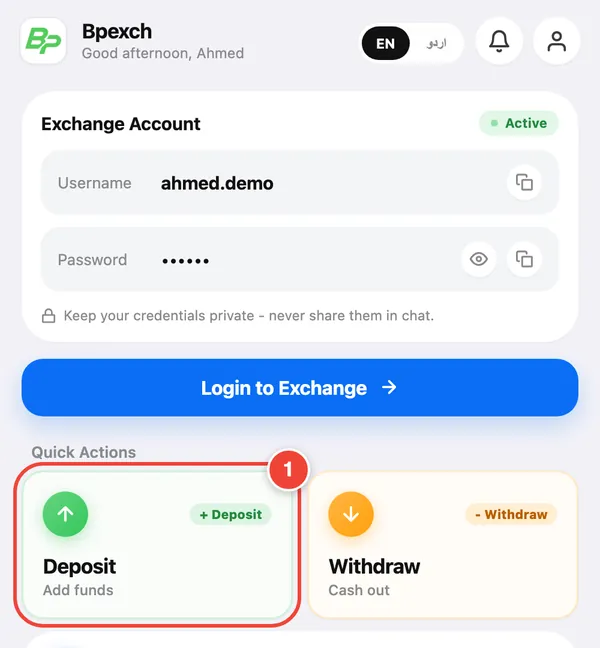
Home screen: tap Deposit (1). - Select Bank. Choose one of the active accounts in the list (JazzCash, Easypaisa or a bank account), then tap Next.
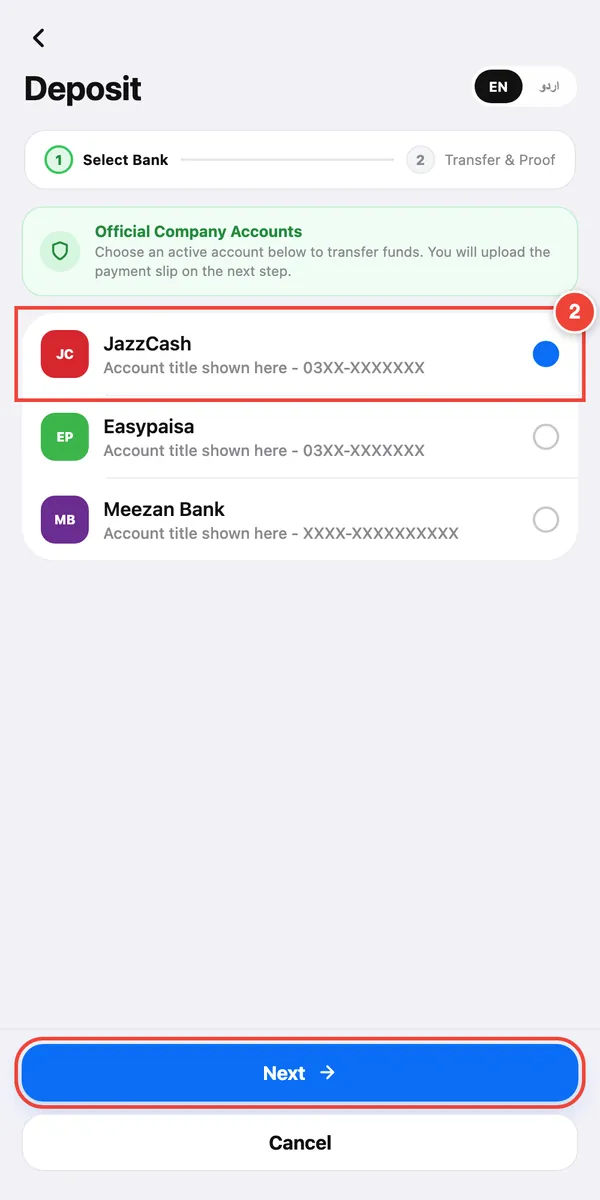
Choose the account you will pay into (2), then tap Next. - Copy the account number shown for that account and send the money from your wallet or banking app.
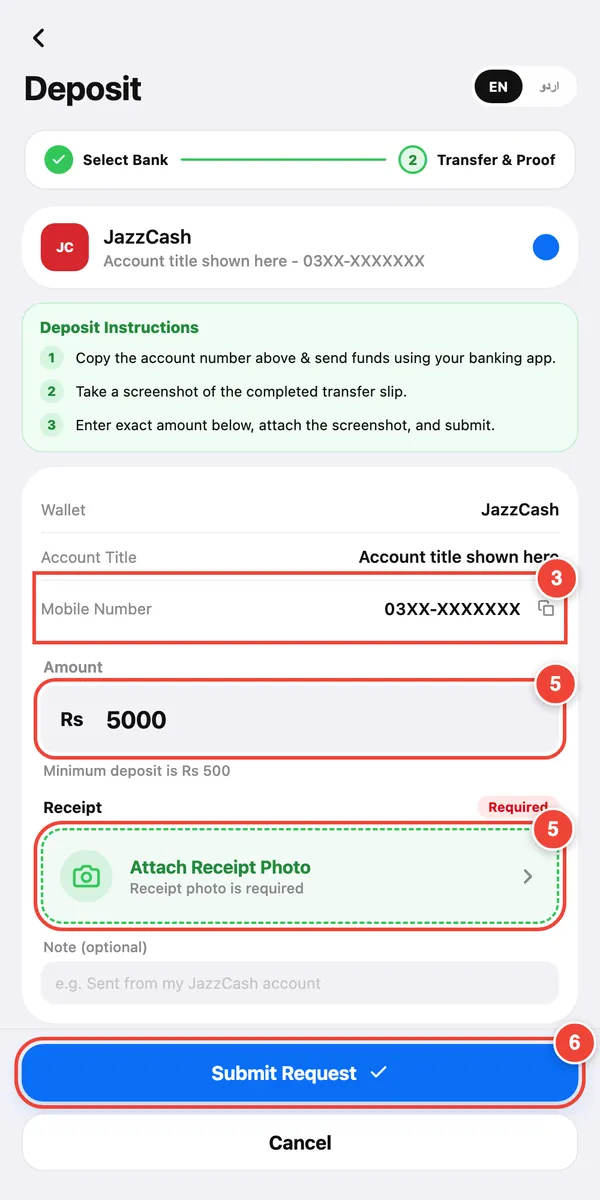
Copy the number (3), enter the exact amount and attach the receipt (5), then tap Submit Request (6). - Take a screenshot of the completed transfer in your wallet or bank app. Make sure the amount and the transaction ID are easy to read.
- Enter the exact amount you sent and attach the screenshot as the receipt photo. Add a note if you want.
- Tap Submit Request.
- Wait for approval. The request shows as Pending, then Approved or Rejected. You get a notification either way.
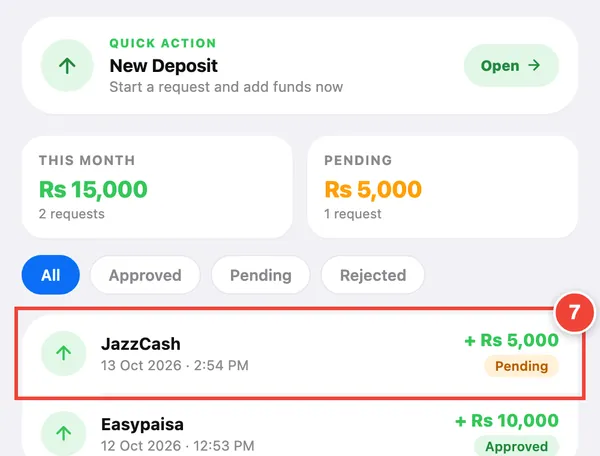
Your deposit shows as Pending (7) until a team member approves it.
Tips for each method
| Method | Good to know |
|---|---|
| JazzCash | Send from the JazzCash app to the number shown in Bpexch, then screenshot the success screen. |
| Easypaisa | Send from the Easypaisa app to the account shown in Bpexch, then screenshot the success screen. |
| Bank transfer | Use your bank's app to send to the account title and number shown. Screenshot the confirmation page. |
Why a deposit can be rejected
- The amount you entered does not match the receipt.
- The screenshot is unclear, cropped, or shows a transfer that did not complete.
- The money went to an account that is not listed in the app.
- The same receipt was already used for another request.
The reason appears in your deposit history. Fix the issue and submit a new request.
Only pay into accounts shown inside your Bpexch account. If someone on WhatsApp sends you a different number, do not pay. Check with support first.
Deposit hours
Deposits are accepted during the hours set by the team. If deposits are closed when you open the Deposit screen, the app tells you.
Common questions
How long does a deposit take?
Deposits are usually approved within 15 minutes after you submit the receipt.
Why is my deposit still pending?
It is waiting for a team member to check your receipt. Clear screenshots and the exact amount help it go through faster.
Can I make a second deposit while one is pending?
No. Wait until the open request is approved or rejected, then start a new one.
What is the minimum deposit?
It can differ by account. Check Profile → Deposit Limits after you log in.
I sent money to the wrong account. What now?
Message support on WhatsApp straight away with the receipt. To avoid this, only pay into the accounts shown on the Deposit screen.
Roman Urdu mein sawal jawab
JazzCash ya Easypaisa se deposit kaise karen?
Home par Deposit dabayen, list mein se account chunen aur Next dabayen. Us account mein paise bhejen, bilkul wohi raqam likhen, receipt ka screenshot lagayen aur Submit Request dabayen.
Deposit approve hone mein kitna waqt lagta hai?
Aam taur par receipt bhejne ke 15 minute ke andar deposit approve ho jata hai.
Mera deposit pending kyun hai?
Team abhi aap ki receipt check kar rahi hai. Saaf screenshot aur bilkul sahi raqam se kaam jaldi hota hai. Paise sirf app mein dikhaye gaye account mein hi bhejen.